Showing posts with label laptop. Show all posts

Acer Aspire S3 Review


Acer Aspire S3 Review
The Acer Aspire S3 looks very nice in the product photos, and it is often associated with Ultrabooks because this type of design, which is inspired from the Macbook Air, has been used by many PC manufacturers in their recent designs. I like the new look very much, and I have been pretty bullish about Ultrabooks, at least much more than I ever was about Netbooks. Although Ultrabooks often share a similar hardware platform from Intel, they differ more than one may think, and depending on how they were designed, the end-user experience can be very different from one model to the next, so don’t let the superficial resemblance fool you. In this review, I will tell you how it felt to use the Acer Aspire S3 and we will look at what I felt was its strengths and weaknesses. Ready?

Technical highlights

13.3” WXGA (1366×768)
Core i5 2467M (dial-core) 1.6Ghz, 4GB RAM
GPU: Intel 3000
Windows 7 Home 64
320GB HDD (283GB formatted), 5400rpm, 8MB cache, 3Gb/s
WiFi B/G/N, Bluetooth 4.0
3-Cell battery 3260mAh
0.7 x 12.7 x 8.6”
2x USB 2.0
Acer Aspire S3 official specs

Industrial design

Acer Aspire S3 Review
Our unit had a custom paint job
The Acer Aspire S3 Ultrabook has an agreeable design. It is thin, compact, and light. The loaner unit that we have even has a custom paint job that was done for Intel. The case seems to be built with a Magnesium alloy, which is a classic material for laptops and notebooks. Overall, it feels rigid enough, but there is a little bit of “flex”, especially with the display – it’s not as flexible as the Toshiba Ultrabook Z830 whose screen is *very* flexible, but we’re definitely not in the rigidity territory that the Macbook Air or Asus Zenbook are in.
Acer Aspire S3 ReviewIn the back of the computer, you will find one HDMI port, two USB 2.0 ports, and the power connector. This is a good placement if you mainly use the computer on a desk as there won’t be any cables popping out from the sides, but if you need to plug and unplug things regularly, this may be a bit annoying. For example, we often use a 3G USB modem, and with the USB port in the back, it is possible (or probable) that backwards tilting would apply pressure to any USB device. You’ll have to think about this a little, and decide what works for you.
Because most of the ports are in the back, the sides are left clean with just a 3.5mm audio jack (left) and a full-size SD slot on the right (see photo gallery at the bottom).
Overall, I found the build quality to feel a bit “plastic”, and I think that Acer should improve upon this, because with its XPS 13 Ultrabook ($999 with 128GB SSD), Dell has a much nicer (partial) carbon-fiber construction and a better “soft touch” finish wherever carbon-fiber is not used. TheHP Envy 14 Spectre (see Envy Spectre 14 demo) is also extremely nice, and the build quality is even higher than the XPS 13. However, it is much more expensive, and at 4+lbs, it is heavier.
Acer Aspire S3 Review
Keyboard (average, no back light): for the most part, the keyboard is decent and there are no major complaints. The only thing that should really be different are the arrow keys. They feel tiny, because they *are* tiny. I don’t know for you, but if you type a lot of text, chances are that “Shift/CTRL + arrow” is a pretty big deal because that allows one to quickly navigate within a sentence. Also, I wish that there was a backlit keyboard, but this is not the case. Again, some people care, while others don’t. Find out in which category you stand.

Acer unveils ICS-ready Iconia Tab A200 tablet


Acer has unveiled a new addition to its Iconia tablet series in the oddly familiar shape of the Iconia Tab A200. The budget-friendly A200 shares much of its hardware profile with the company's Iconia Tab A500 launched earlier in the year, although the former lacks a rear-facing camera and will come in 8GB and 16GB varieties only. When it first hits the shelves, the new tablet will run on Android 3.2 but Acer says that as soon as Google's next flavor of Android (codenamed Ice Cream Sandwich) is released in January 2012, the new tablet will be switched to the new operating system - with a free upgrade to Android 4.0 for existing A200 owners.

Although Acer says that its new Android tablet will be easy on the wallet, the company hasn't actually released any pricing information. As such, the high point of the announcement seems to be the Acer Ring interface overlay that provides easy access to apps from any screen - appearing when needed and hidden when not. The Iconia Tab A200 also includes social media consolidation with Acer's SocialJogger, placing networking feeds from portals like Facebook, Twitter, YouTube and Flickr into one location.

The new tablet will be available in either red or gray, with a patterned soft-touch rear face. It will feature a 10.1-inch, 1280 x 800 resolution multitouch display, an NVIDIA Tegra 2 dual core A9 processor running at 1GHz supported by 1GB RAM, and a 2 megapixel webcam in the front bezel. There'll be either 8GB or 16GB of onboard eMMC solid state storage - with microSD expansion, a full sized USB port, 802.11b/g/n Wi-Fi and Bluetooth 2.1 with EDR, and built-in GPS.
The device can also wirelessly share content with other DNLA-compliant devices via Acer's clear.fi technology, and users in the U.S. and Canada will get access to Netflix. The 3260 mAh/24.1 W Lithium Polymer battery is said to be good for 400 hours on standby or 8 hours of video playback.
The Iconia Tab A200 is set for a Q1 release in the UK, with pricing yet to be been finalized. An announcement on U.S. availability is due in the next few weeks.
Acer has also told us that a product page will appear shortly. Until then, the tablet's notable features are overviewed in the following promo video from Acer:


HP ProBook Business notebooks


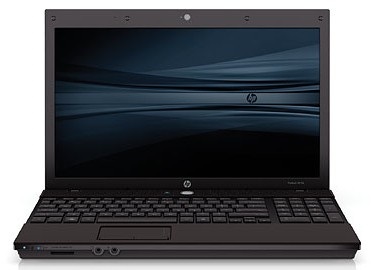
HP ProBook

The HP ProBook 4510s is the latest 15.6" business notebook designed to provide solid performance at a low price for small and medium businesses. If your company wants the HP Elitebook 8530p but doesn't have the budget to spend $1,350 per laptop, the ProBook 4510s might be a good alternative at a starting price of just $529. Is this budget-priced business notebook destined for success? Take a look at our full review to find out.

Our pre-production review unit of the ProBook 4510s is configured as follows:

* Intel Core 2 Duo T6570 Processor (2.1GHz, 2MB L2 cache, 800MHz FSB)
* Microsoft Genuine Windows Vista Business (with option for Windows XP downgrade)
* 15.6-inch LED-backlit anti-glare HD display (1366 x 768)
* Intel Graphics Media Accelerator 4500MHD
* 2GB DDR2 800MHz RAM
* 250GB 5400RPM HDD
* LightScribe DVD+/-RW Optical Drive
* WiFi (802.11a/b/g/draft-n), Ethernet, Modem, and Bluetooth Connectivity
* 8-Cell 63WHr Battery
* Limited 1-year standard parts and labor warranty
* Dimensions: 1.25" x 14.6" x 9.83"
* Weight: 5.8lbs
* Price as configured: $749

Build and Design
The HP ProBook 4510s is a business notebook designed to meet the needs of small and medium businesses ... in other words, it needs to have a good balance of features and security at a low price. That said, small and medium business notebooks tend to have a very basic build and deign in order to help bring down the cost of production. At first glance, the ProBook 4510s looks very similar to a HP EliteBook 8530p with a new keyboard and all black finish. Unfortunately, the design similarities stop there.

HP received much praise for the strong magnesium alloy chassis used in the EliteBook series of business notebooks. Unfortunately, in order to lower the cost and weight of the notebook the ProBook 4510s is constructed mostly of plastic. The base of the laptop flexes heavily under pressure, the palmrests likewise bow under the weight of your wrists, and the back of the screen lid is similarly prone to flex. The plastics used in the 4510s should hold up fine if the notebook is being used as an office desktop replacement, but the chassis might not survive multiple drops off a desk or the kind of abuse you expect from a mobile workforce. On the bright side, the new keyboard is pretty firm except for a very minor amount of flex around the directly above the optical drive (more on that later). The key point to remember in this section is that the ProBook 4510s looks pretty nice, but isn't as rugged as more expensive business notebooks.

LinkWithin

Related Posts with Thumbnails