Showing posts with label cheap tablet. Show all posts

Aakash Tablet Available Online for Rs 2500; Ubislate 7 in Jan 2012


The Indian Government’s $35 ‘Aakash’ Tablet, which was launched for $47 (Rs 2250) in October, is now available for online purchase at Rs 2500 from Aakashtablet.com . The report also points out that an upgraded version of the tablet, dubbed as Ubislate 7, will be available in late January 2012, and is currently available for pre-order.


Aakash Tablet: Aakash tablet, which the company is claiming as the student version of ‘Ubislate 7′, was designed, developed and manufactured by the Canadian based DataWind in collaboration with IIT Rajasthan, under the HRD Ministry’s National Mission on Education through Information & Communication Technology (NME-ICT). It runs on Android 2.2 and comes with a 7-inch screen, 366 Mhz Conexant processor with Graphics accelerator & HD Video processor, 256MB RAM, 2GB internal flash memory, External memory support of up to 32GB, 21oomAh battery, and WiFi connectivity. The tablet  is also preloaded with its UbiSurfer browser which, according to the company, accelerates web pages by factors of 10x to 30x, and Nimbuzz instant messaging app.


The tablet can only be ordered from Aakashtablet.com and it will reportedly be shipped in a week’s time. The payment will happen through cash on delivery (CoD) with no pre-payments involved. Datawind states that this online availability is limited for individual buyers since it has already achieved pre-sale orders of about 400,000 tablets from individuals and corporates, and about 30,000 tablets are available for purchase at the moment, according to The Economic Times.


Ubislate 7: The commercially available mass market tablet which was earlier anticipated to be launched in November 2011, seems to have been pushed off to a January 2012 launch with a price tag of Rs 2,999. This tablet, according to the company, will be an upgraded version of the Aakash tablet and will feature a a newer Android version (Android 2.3 ‘Gingerbread’), better processor (700MHz), improved battery life (3200 mAh), SIM and phone functionality and support for Wi-Fi with GPRS. One can currently pre-book this tablet, following which a booking ID will be mailed to you.

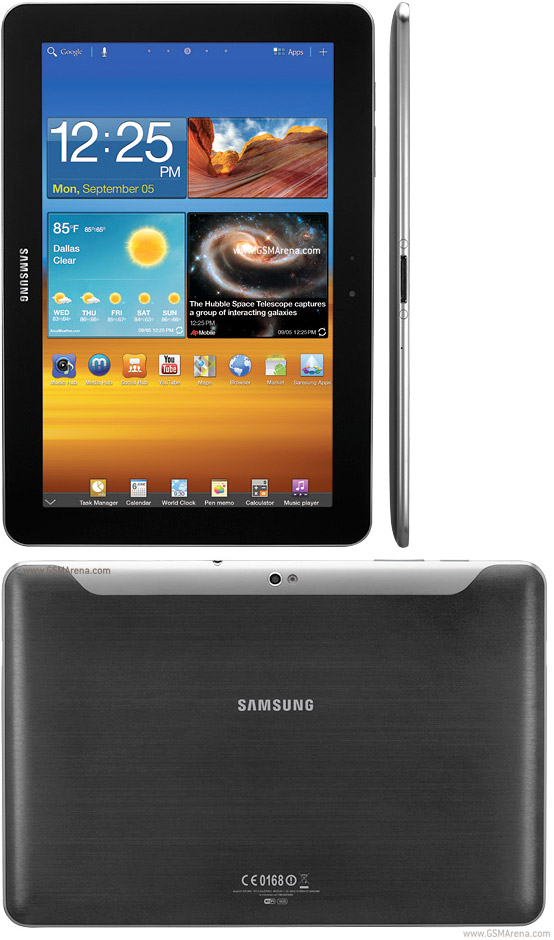
Galaxy Tab 8.9


Screen Shot 2011-11-28 at 6.33.53 PM
Short Version
The Galaxy Tab 8.9 is a nearly perfect size and weight and, thanks to a few user experience updates, it is an excellent vehicle for Android Honeycomb 3.2. In many cases the dreaded Android lag is gone and 8.9 screen size is, like the Baby Bear’s porridge, just right.
Features:
  • 8.9-inch screen
  • Android Honeycomb 3.2
  • 16GB storage
  • Front and rear cameras
  • $479 with free phone
Pros:
  • Thin and light
  • TouchWiz UI Improves Honeycomb
  • 9 hour battery life
Cons:
  • No expandable storage
  • $50 less than the 10.1
  • LTE version is bundled with contract

The Galaxy Tab 8.9, announced earlier this month, is now available on AT&T’s LTE network. This model is part of a package that comes with a Galaxy S II – probably one of the best Android phones I’ve used yet – and requires a service plan. These are the first things to consider before looking deeper into this particular device.
Purchasing considerations aside, how does this 1.5Ghz Qualcomm MSM8660 dual-core device perform? I’m happy to report that it runs quite admirably, hitting 9 hours of battery life on a single charge and acceptable performance on AT&T’s LTE and 4G networks.

What Is It?
The device has, as the name implies, an 8.9-inch screen and is amazingly thin and light. At 15.8 ounces it is one ounce heavier than the Kindle Fire and much lighter than the 22 oz iPad 2. The screen, a 1,280×800 pixel 16:9 PLS TFT LCD, is bright and the touchscreen responsive and this is probably the first Android tablet that felt “fluid” in terms of user experience and app speed.
There is no removable storage and you get about 12GB available for your own media. It has a front 2-megapixel camera and a rear 3-megapixel camera with auto-focus. The shots, as expected, are not Ansel Adams quality but, in their own way, acceptable.
There is a power button on the top left, audio controls next to that button, and a headphone jack. There is a small SIM card slot on the right top edge and two speakers on the bottom that offer slightly muffled audio, especially when the device is laid along its bottom edge (the part where the Samsung logo is embossed).
The Good
The device does everything acceptably well. Video playback is smooth and it supports 3GP, MP4, AVI, WMV, FLV, and MKV playback as well as your standard audio files. I gave it a quick Netflix playback test and got about 5 hours of straight streaming – two movies worth – before the battery was catastrophically low. On board playback sees about 8 hours although your milage may vary.
As for the screen size, I quite like it. It’s thin, light, and the screen is bright and readable. It was fine outdoors, but it’s obviously not ideal for outdoor use. It makes an excellent e-reader, as well, especially since it is lighter than many similarly-priced tablets.
The TouchWiz UI adds little in the way of improvement to the standard Honeycomb experience but it does add a few simple tools that make the tablet easier to use. For example, there is a small arrow along the bottom edge that brings up a set of widgets like Calendar, Task Manager, and Calculator. These open as modal windows over the actual apps running in the background and allow for easier multi-tasking.
In the end the 8.9 reminds me, in a good way, of the old single-purpose PMPs of yore. It does quite a bit right and not much wrong and is an interesting and useful bedside, travel, and couch-surfing companion.
The Bad
First, this device is completely self-contained and does not support battery swapping or the addition of storage. Although you get a healthy 9 hours out of it.
Another software problem I experienced was the failure for many Youtube video to load in the standalone app. The player would load a few seconds and then repeat.
Other than that, there was little to disuade me from recommending this device, let alone reviewing it. You’re obviously going to be stuck with AT&T if you pick this up and you’re best served by living in a location with LTE access, but that’s the price you pay for progress.
If this were the Wi-Fi only model I’d find even more to love. The 16GB, non-AT&T version costs $399 and the 32GB is $549.
Bottom Line
I believe that there is such a thing as tablet fatigue and that it set in once the run up to the Motorola Xoom left everyone panting at CES last year. We don’t review a lot of Android tablets simply because we find many of them derivative at best. However, I believe that this device does its best to avoid the pitfall of fatigue. It is uniquely-sized, surprisingly responsive, and well-made. Purists will complain about the lack of removable storage and the overall pricing scheme because, if you’ll remember, this model comes bundled with a phone, the highly capable Galaxy S II.
You’re obviously going to have to compare this device with the Gal Tab 10 (and any smaller member of the Gal Tab family) as well as the cavalcade of Android devices out there. However, in looking at many devices over the past few months – including tablets of various stripes, both Android and Win7, and some lesser devices in the low $100s – I find this one to be superior to most. I feel that this is a strong, capable device that, if you’re looking to upgrade on AT&T, obviously, can make for a usable and exciting tablet.

Samsung Galaxy Y - Low cost Smartphone

The Samsung Galaxy Y, since entry level doesn’t necessarily mean a subpar device, and such devices often sell by the boatload. The Y stands for “young”, and means an affordable handset for teens or emerging markets in the sabout 8000 INR price .


Some of the Galaxy Y’s specs are marginally better than the Galaxy Mini, for example, like a slightly faster 832MHz processor and less weight, but the camera is 2MP vs 3MP in the Mini. The biggest improvement actually seems to be the Android OS version – we are running Gingerbread on the Galaxy Y.


We also have a design that is not your typical cheap black plastic handset, but is this an event enough to earn big sales in the low-end Android range, considering it's always crowded down there? Read on the review to find out...


In the box:


Samsung Galaxy Y handset
2GB microSD card
Wall charger
microUSB cable
Warranty and instructions leaflets


Design


The outer appearance of the Samsung Galaxy Y stand out with a silvery back cover and chrome-like rim around the screen half – only the front is black. Alright, one for the design team here, since it found a cheap way to break away from the mould.


The Samsung Galaxy Y is very small, and gets lost in larger hands - Samsung Galaxy Y Review

Moreover, the battery cover has tapered edges and is dotted like snake skin, which make the phone easier to hold. The phone is very small, and gets lost in larger hands, but the 0.45” (11.5mm) thickness is just enough for a good grip. Needless to say, working it with one hand is not an issue, and your thumb reaches everywhere.

The basic 3” LCD display has 240x320 pixels of resolution, but it is fairly bright, and the viewing angles are decent. A slightly larger screen with better resolution would have managed to set it further apart, since now it sports a display equal to the previous lowest of the low from Samsung. Even at that small size, the interface still looks grainy due to the crappy resolution.

Front - Samsung Galaxy Y Review
Buttons below the display - Samsung Galaxy Y Review
Front
Buttons below the display
The power/lock button on the right, and the volume rocker on the left are easy to feel, and get pressed with soft but distinct travel. We have a microUSB port at the top covered with a protective flap.


Price in India : INR 8000/-


Acer unveils ICS-ready Iconia Tab A200 tablet


Acer has unveiled a new addition to its Iconia tablet series in the oddly familiar shape of the Iconia Tab A200. The budget-friendly A200 shares much of its hardware profile with the company's Iconia Tab A500 launched earlier in the year, although the former lacks a rear-facing camera and will come in 8GB and 16GB varieties only. When it first hits the shelves, the new tablet will run on Android 3.2 but Acer says that as soon as Google's next flavor of Android (codenamed Ice Cream Sandwich) is released in January 2012, the new tablet will be switched to the new operating system - with a free upgrade to Android 4.0 for existing A200 owners.

Although Acer says that its new Android tablet will be easy on the wallet, the company hasn't actually released any pricing information. As such, the high point of the announcement seems to be the Acer Ring interface overlay that provides easy access to apps from any screen - appearing when needed and hidden when not. The Iconia Tab A200 also includes social media consolidation with Acer's SocialJogger, placing networking feeds from portals like Facebook, Twitter, YouTube and Flickr into one location.

The new tablet will be available in either red or gray, with a patterned soft-touch rear face. It will feature a 10.1-inch, 1280 x 800 resolution multitouch display, an NVIDIA Tegra 2 dual core A9 processor running at 1GHz supported by 1GB RAM, and a 2 megapixel webcam in the front bezel. There'll be either 8GB or 16GB of onboard eMMC solid state storage - with microSD expansion, a full sized USB port, 802.11b/g/n Wi-Fi and Bluetooth 2.1 with EDR, and built-in GPS.
The device can also wirelessly share content with other DNLA-compliant devices via Acer's clear.fi technology, and users in the U.S. and Canada will get access to Netflix. The 3260 mAh/24.1 W Lithium Polymer battery is said to be good for 400 hours on standby or 8 hours of video playback.
The Iconia Tab A200 is set for a Q1 release in the UK, with pricing yet to be been finalized. An announcement on U.S. availability is due in the next few weeks.
Acer has also told us that a product page will appear shortly. Until then, the tablet's notable features are overviewed in the following promo video from Acer:


LinkWithin

Related Posts with Thumbnails