Short Version
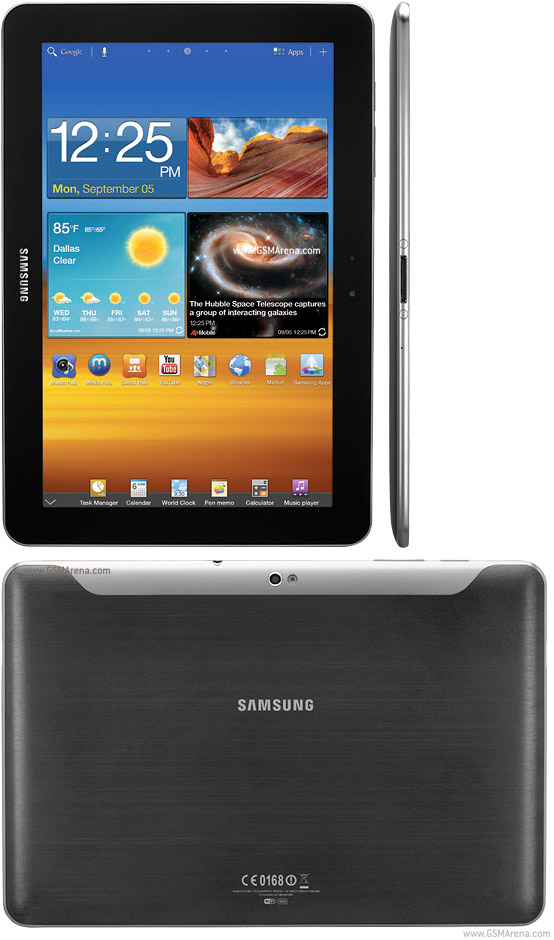
The Galaxy Tab 8.9 is a nearly perfect size and weight and, thanks to a few user experience updates, it is an excellent vehicle for Android Honeycomb 3.2. In many cases the dreaded Android lag is gone and 8.9 screen size is, like the Baby Bear’s porridge, just right.
Features:
- 8.9-inch screen
- Android Honeycomb 3.2
- 16GB storage
- Front and rear cameras
- $479 with free phone
Pros:
- Thin and light
- TouchWiz UI Improves Honeycomb
- 9 hour battery life
Cons:
- No expandable storage
- $50 less than the 10.1
- LTE version is bundled with contract
The Galaxy Tab 8.9, announced earlier this month, is now available on AT&T’s LTE network. This model is part of a package that comes with a Galaxy S II – probably one of the best Android phones I’ve used yet – and requires a service plan. These are the first things to consider before looking deeper into this particular device.
Purchasing considerations aside, how does this 1.5Ghz Qualcomm MSM8660 dual-core device perform? I’m happy to report that it runs quite admirably, hitting 9 hours of battery life on a single charge and acceptable performance on AT&T’s LTE and 4G networks.
What Is It?
The device has, as the name implies, an 8.9-inch screen and is amazingly thin and light. At 15.8 ounces it is one ounce heavier than the Kindle Fire and much lighter than the 22 oz iPad 2. The screen, a 1,280×800 pixel 16:9 PLS TFT LCD, is bright and the touchscreen responsive and this is probably the first Android tablet that felt “fluid” in terms of user experience and app speed.
There is no removable storage and you get about 12GB available for your own media. It has a front 2-megapixel camera and a rear 3-megapixel camera with auto-focus. The shots, as expected, are not Ansel Adams quality but, in their own way, acceptable.
There is a power button on the top left, audio controls next to that button, and a headphone jack. There is a small SIM card slot on the right top edge and two speakers on the bottom that offer slightly muffled audio, especially when the device is laid along its bottom edge (the part where the Samsung logo is embossed).
The Good
The device does everything acceptably well. Video playback is smooth and it supports 3GP, MP4, AVI, WMV, FLV, and MKV playback as well as your standard audio files. I gave it a quick Netflix playback test and got about 5 hours of straight streaming – two movies worth – before the battery was catastrophically low. On board playback sees about 8 hours although your milage may vary.
As for the screen size, I quite like it. It’s thin, light, and the screen is bright and readable. It was fine outdoors, but it’s obviously not ideal for outdoor use. It makes an excellent e-reader, as well, especially since it is lighter than many similarly-priced tablets.
The TouchWiz UI adds little in the way of improvement to the standard Honeycomb experience but it does add a few simple tools that make the tablet easier to use. For example, there is a small arrow along the bottom edge that brings up a set of widgets like Calendar, Task Manager, and Calculator. These open as modal windows over the actual apps running in the background and allow for easier multi-tasking.
In the end the 8.9 reminds me, in a good way, of the old single-purpose PMPs of yore. It does quite a bit right and not much wrong and is an interesting and useful bedside, travel, and couch-surfing companion.
The Bad
First, this device is completely self-contained and does not support battery swapping or the addition of storage. Although you get a healthy 9 hours out of it.
Another software problem I experienced was the failure for many Youtube video to load in the standalone app. The player would load a few seconds and then repeat.
Other than that, there was little to disuade me from recommending this device, let alone reviewing it. You’re obviously going to be stuck with AT&T if you pick this up and you’re best served by living in a location with LTE access, but that’s the price you pay for progress.
If this were the Wi-Fi only model I’d find even more to love. The 16GB, non-AT&T version costs
$399 and the
32GB is $549.
Bottom Line
I believe that there is such a thing as tablet fatigue and that it set in once the run up to the Motorola Xoom left everyone panting at CES last year. We don’t review a lot of Android tablets simply because we find many of them derivative at best. However, I believe that this device does its best to avoid the pitfall of fatigue. It is uniquely-sized, surprisingly responsive, and well-made. Purists will complain about the lack of removable storage and the overall pricing scheme because, if you’ll remember, this model comes bundled with a phone, the highly capable Galaxy S II.
You’re obviously going to have to compare this device with the Gal Tab 10 (and any smaller member of the Gal Tab family) as well as the cavalcade of Android devices out there. However, in looking at many devices over the past few months – including tablets of various stripes, both Android and Win7, and some lesser devices in the low $100s – I find this one to be superior to most. I feel that this is a strong, capable device that, if you’re looking to upgrade on AT&T, obviously, can make for a usable and exciting tablet.